How to choose tattoo and piercing studio software

By Nate Laff, builder of REV23

You’re about to trust a company with your client records, signed release forms, deposits, and photographs of years of work. It’s worth looking past the website before you do.

I build REV23. I’ve been building and supporting software for tattoo and piercing professionals since 2010, so I have an obvious stake in this conversation. I hold myself and every line of code REV23 ships to a high standard, and I expect the same from anyone asking this industry to trust them. Spoiler alert: that’s not always what I see.

I also know how little a feature list tells you. Booking. Forms. Payments. Client records. You can find those words on almost any software website, and lately it seems another one pops up every day.

What does the software understand about your work? Who’s responsible after you’ve moved your business in? These are the things I’d check. Hold REV23 to them, too.

Make them show you what “built for tattoo and piercing” means

Adding the word “tattoo” does not make it tattoo software.

For tattooing, bring a piece that takes several sittings. Can you follow its consultations, releases, progress photographs, and recorded materials? Can a deposit carry through earlier sittings before you apply it?

Then ask who’s holding that deposit. Cash an artist holds and a card payment in the studio account are different. That matters when you work out what someone is owed, including when the client doesn’t show.

For piercing, ask them to price what you actually install. Your post and end have their own sizes, materials, and prices. Try a pair of lobes, then a lobe and a helix. Ask how included jewelry and upgrades affect the price, and whether you can find the original installation when the client returns for a downsize.

Bring the things you usually have to explain. Your books might be closed to new clients while regulars can still book. Friday the 13th might be walk-ins only. A PMU perfecting visit might be included in the original price.

What happens when the health department shows up and asks to see signed release forms? Try pulling up the exact form a client signed, with the identification and guardian information you’re required to keep. Then find the ink and needle lots recorded for that sitting. Bring your local recordkeeping requirements to the demo and make them show you how you’d produce those records.

You’ll learn more from those examples than from another page promising to “streamline your business.”

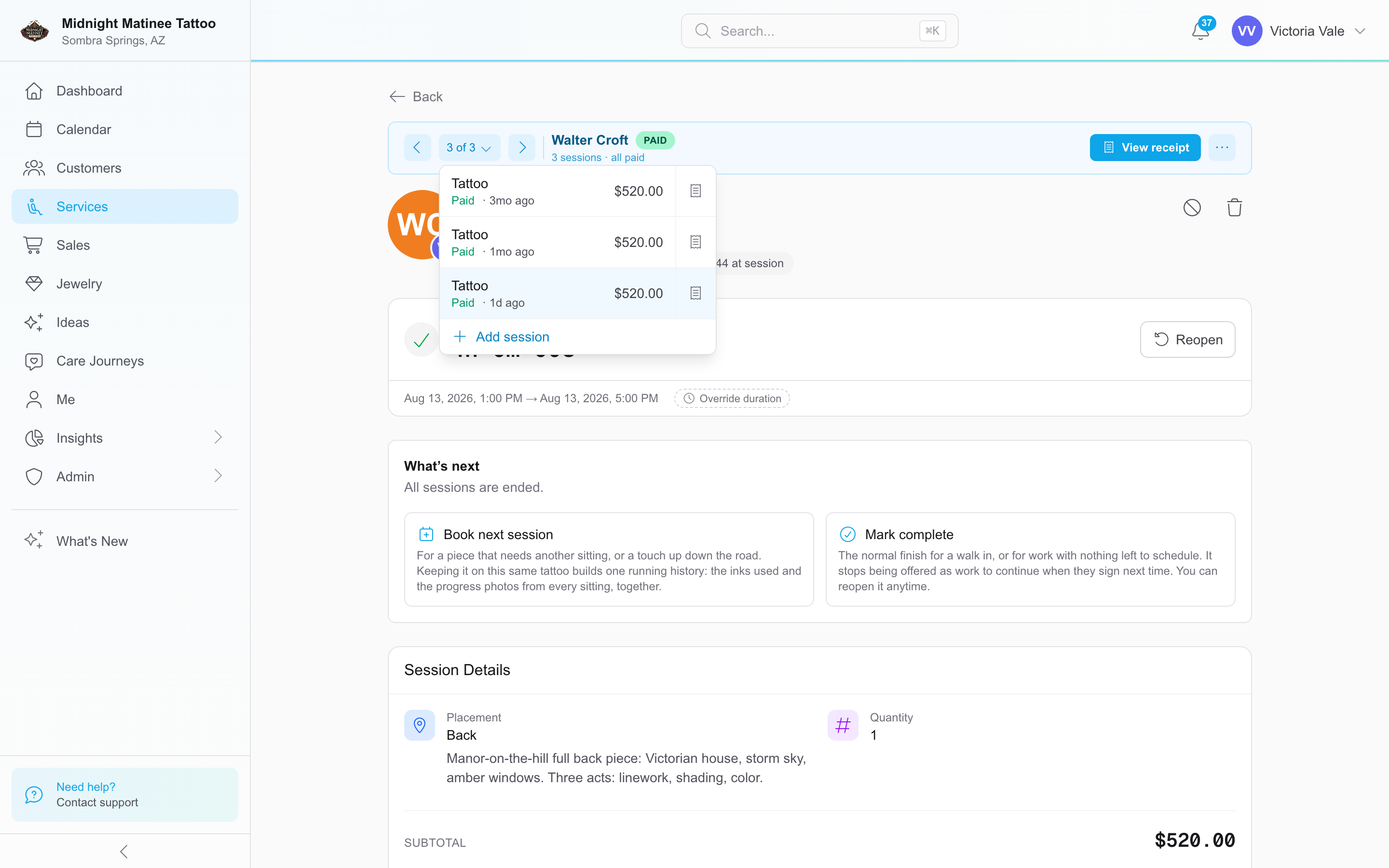
Walter Croft’s tattoo in REV23 with three sittings under Victoria Vale and a shared service record
Three sittings of one tattoo in the same service record. Select to enlarge.See tattoo work across sittings

Look for the actual product

Look for screenshots that show the actual app and documentation you can open before signing up. A website full of tattoo photography tells you who the company wants to sell to. It doesn’t show you what it has built.

Use the trial. If access requires a demo, bring your own examples. A prepared presentation can skip the exact part you need to understand.

Have the people who’ll use it do the work. Let your front desk find a signed form and whoever handles the books check an artist’s earnings. Follow a preparation or aftercare message through to the client’s reply. Where does that reply go?

Then change something. Move an appointment. Partly forfeit a deposit. Correct a sale with a tip and split payment. Check what belongs to the artist, what belongs to the studio, and what is still owed.

Pay attention to what exists today. I know how tempting it is to talk about what’s coming. But you’re choosing software for work you have to do today, not six months from now.

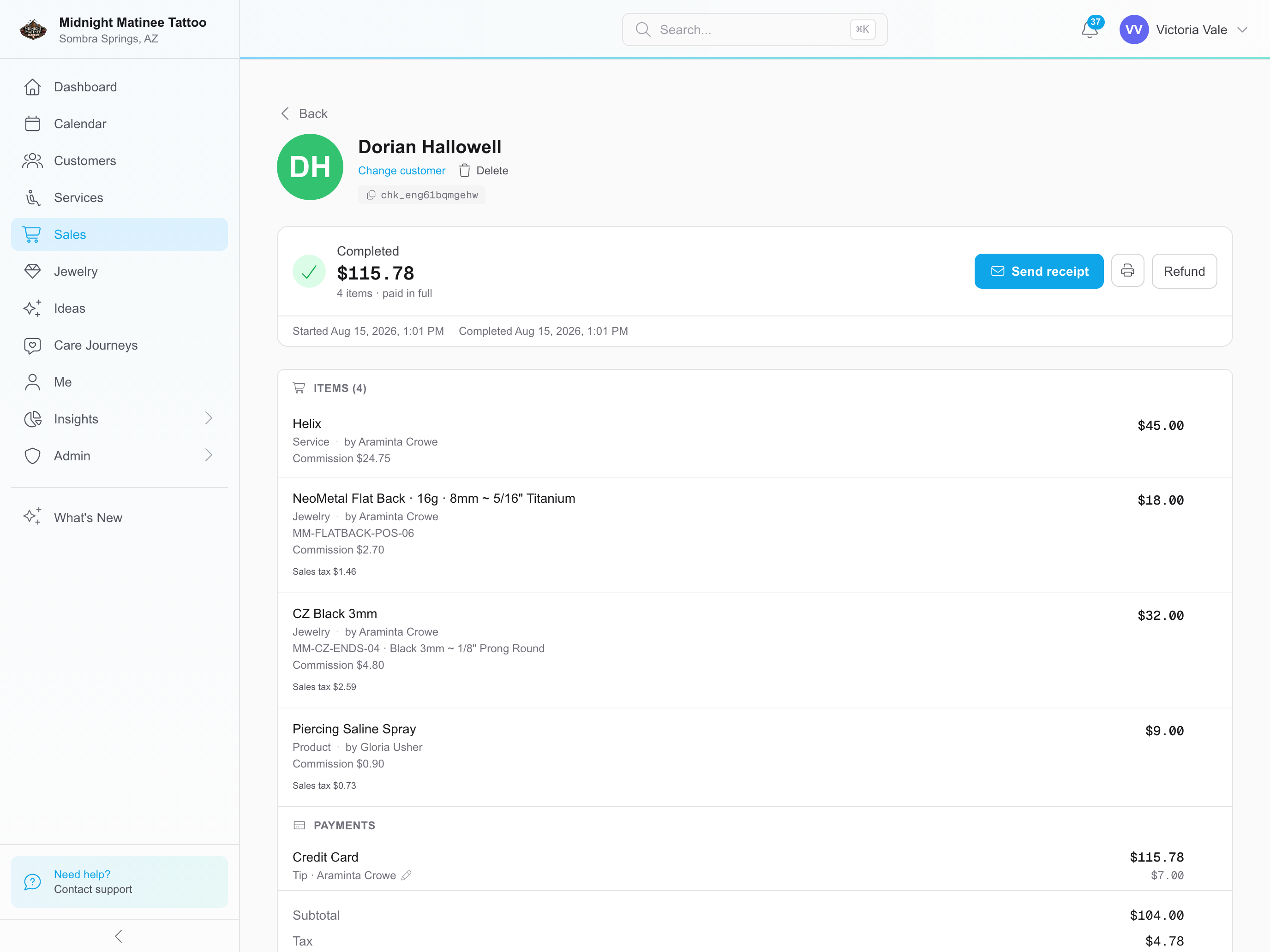
REV23 piercing sale showing the helix service, post, end, artist commissions, and tip separately
The piercing, installed post and end, and artist earnings shown separately. Select to enlarge.See piercing and jewelry pricing

Find out who you’re doing business with

Who makes the software? Can you identify the business and the people responsible for it?

Find the company name in the footer, terms, or privacy policy, then see what else it sells. If it offers software for salons, barbers, gyms, and tattoo studios, open those sites side by side. If the screenshots look the same and only the name, colors, and trade nouns change, I’d expect very little in the tattoo offering to have been built specifically for tattooing and piercing. Make them prove otherwise. “Built for your industry” should survive a little digging.

Check the domain, too. Open ICANN Lookup, enter the domain name, such as example.com, and look for the registration or creation date. It shows when the domain was registered, not when the company started or this website launched. Companies can change domains or buy older ones. But if the domain was registered last month and the website implies years of history, ask where you can see that history.

For a company asking you to trust it with your business records, a Gmail address for support isn’t good enough. Email at the company’s own domain is a basic expectation. It doesn’t prove your records are safe, but it’s a standard I expect a software company to meet.

Send a specific question before subscribing. Does the answer address what you asked? Are they comfortable telling you when the product won’t do something? Then ask an existing customer how fast support replies when there isn’t a sale on the line.

I’ve built REV23 myself since 2010. I’m hardly going to tell you a software company needs a room full of developers. But you should be able to find out who’s building it and why you should trust them with your business.

Ask who’s looking after it once it ships

It’s getting easier to put together an impressive first version of an app. Your records may need to survive several generations of it.

Someone has to test updates, fix mistakes, and help customers recover when things go wrong. Whether that person uses AI won’t settle those questions. You want to know they understand what they’re shipping and will answer for it.

Ask what happens when an update causes a problem. Ask how records are backed up and whether restoring them has been tested. You don’t need to understand the code to expect a clear answer.

Who answers when checkout is blocked on Saturday? If a payout goes missing, who helps you find it? What can you still do if your internet connection, payment processor, or the software goes down, and how do you catch up afterward?

“Contact support” leaves quite a bit unanswered.

The years matter at REV23 because we’ve had to make these decisions, live with them, and answer to the people using what we built. Someone can copy a feature without understanding why it works the way it does. They don’t get the lessons we learned building and supporting it, or the judgment those lessons bring to the next decision.

Know who can see and change things

Your front desk, artists, and whoever handles payroll may need different access.

Ask who can see identification, health disclosures, private photographs, and financial records. Who can refund a payment or export the client list? If someone changes a deposit or appointment, can you find out who changed it?

Permission to publish a client’s photograph deserves its own check, separate from consent to perform the service.

Make them explain the claims

“HIPAA compliant” sounds reassuring. But an ordinary tattoo or piercing studio doesn’t become subject to HIPAA just because its release form asks medical questions. HHS explains who the rules cover.

If a software company leads with that claim, ask what it means for your business. What has actually been assessed? Which protections does it provide? Does the company understand whether the law applies to you, or is it borrowing a healthcare term because it sounds impressive?

Your client records deserve protection whether HIPAA applies or not. Ask for the actual practices behind the claim.

Read the data policy, too. Does it cover the client records you’ll actually keep, or just cookies on the company’s website? Look for where records are stored, when the company’s own staff can access them, which outside services receive information, and what happens when records are deleted. Does the company sell client data or use it for marketing? “We take your privacy seriously” isn’t an answer.

You can read REV23’s data protection policy before signing up. It explains those points, including what happens to records when you stop using REV23. Ask other vendors for the same detail.

Consider what happens when an artist leaves with future appointments and outstanding deposits. You still have clients to look after and money to account for. Make sure the software supports the arrangements you actually have.
Get the price for your business

Use your actual artist count, locations, and expected usage when comparing prices. Include messaging, storage, hardware, migration, training, and support. Ask what triggers another charge and whether you’re committing to a contract.

Payments deserve their own conversation. Do you have to use a particular processor or buy particular hardware? What happens to fees when you refund a sale? Who handles disputes, and what do they cost?

If you need an accounting connection or another integration, ask to see what it transfers. A connection that leaves you entering the same figures twice may not solve the problem you’re paying it to solve.

Put REV23 through the same checks

Tattooing and piercing were REV23’s starting point. You can look through our product screenshots and public user guide before signing up, then take a 14-day trial with every feature included and no credit card required.

Bring the situation you’re tired of working around. Ask us to show you how REV23 handles it.

Read the public user guide